STed2
レコンポーザ系ステップ入力 MIDI シーケンサ — X68000 (1991) から現代の Linux へ
A step-input MIDI sequencer in the Recomposer tradition, from the Sharp X68000 to modern Linux.
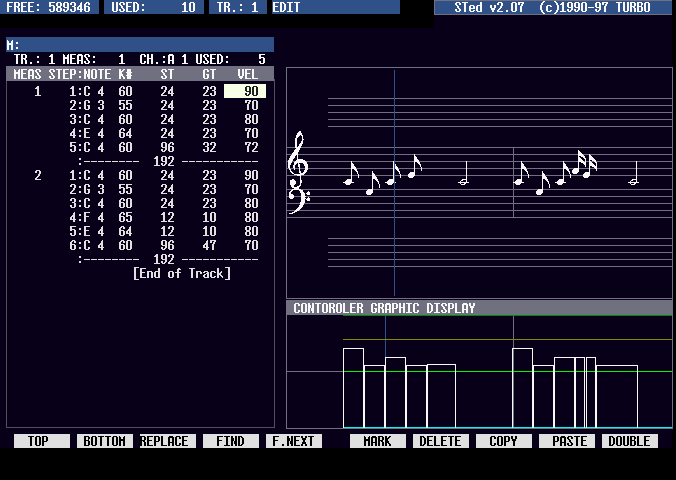
Clockwork DevTerm A06 上の STed2 — データリスト、Ctrl+G 譜面ビュー、コントローラグラフ
これは何?
故・戸田孝之 (TURBO) 氏が X68000 で開発した STed2 の UNIX 移植版 (長野大輔氏、1998〜) を、 64bit・最新 GCC・コンポジタなし X11 で動くよう修理したものです。 数値入力主体の高速なステップ入力、RCP / R36 ファイル、外字による譜面表示——当時の操作感をそのまま残しています。
The UNIX port of STed2 (originally by the late Takayuki "TURBO" Toda, ported by Daisuke Nagano) repaired for 64-bit systems, current GCC, and plain X11. The fast numeric step-input workflow is intact.
インストール / Install
Debian / Ubuntu (amd64, arm64)。Clockwork DevTerm A06 で動作確認済み。
sudo curl -fsSL -o /usr/share/keyrings/sted2-archive-keyring.gpg \
    https://rtanote.github.io/sted2/sted2-archive-keyring.gpg
echo 'deb [signed-by=/usr/share/keyrings/sted2-archive-keyring.gpg] https://rtanote.github.io/sted2 stable main' \
    | sudo tee /etc/apt/sources.list.d/sted2.list
sudo apt update && sudo apt install sted2
sudo usermod -aG audio "$USER"   # 一度ログインし直す / log out and back in
FluidSynth を入れておけば (sudo apt install fluidsynth fluid-soundfont-gm)、
追加設定なしで音が出ます。ソースからのビルドは README 参照。
レコンポーザをお使いだった方へ
STed2 はレコンポーザの操作体系を汲むシーケンサです。機能やキーバインドなど細かな差異はありますが、 RCP / R36 ファイルをそのまま読み書きでき、ST/GT・ベロシティを数値で刻む入力スタイルもそのまま。当時のフロッピーディスクに眠っている RCP データの再生・編集環境としても使えます (SMF への書き出しにも対応)。
STed2 follows the Recomposer school (article in Japanese): minor differences in features and key bindings aside, it reads and writes RCP / R36 files natively and keeps the numeric ST/GT editing style. It also exports SMF — a practical way to revive Recomposer data sleeping on old floppy disks.
主な特徴 / Features
- ステップ入力主体の高速な打ち込み — キーボードだけで完結 / fast keyboard-only step input
- RCP / R36 ネイティブ、SMF 書き出し / native RCP/R36, SMF export
- Ctrl+G 譜面ビューを MusiXTeX 由来のグリフで復元 / restored score view
- FluidSynth + snd-virmidi を自動接続、実機 MIDI 音源も可 / auto-wired soft synth, or real hardware
- X11 + ncurses、DevTerm A06 のような小型機でも軽快 / light enough for handhelds
ハードウェア音源を使う / Using hardware sound modules
FluidSynth ではなく実機の音源(SC-88 や MU シリーズ等を始めとする GM/GS/XG 音源や その他一般的なシンセサイザーなど)を鳴らしたい場合は、USB MIDI クラスコンプライアント対応の インタフェースなら Linux 標準の ALSA ドライバだけで、挿すだけで認識されます(メーカー製ドライバは不要)。 定番は Roland UM-ONE mk2、Yamaha UX16、M-Audio MIDISPORT 系、MIDI 端子付きオーディオインタフェースなど。
- 認識確認は
amidi -l(raw MIDI)とaconnect -l(ALSA seq)。 あとは/etc/sted2/sted2.cnfの#midi_port=/dev/snd/midiCxD0を そのデバイスに書き換えるだけ。FluidSynth が動いていても設定は保持され、 PLAY も自動でハードウェア側に出ます (a06.2 以降) - 無名の激安 USB-MIDI ケーブル(CH345 系)はノート演奏は通っても SysEx が化ける個体が多く、 音源初期化 (GS リセット等) を送る用途には不向き
- MOTU MIDI Express 128 は手元にあるため動作検証予定(未検証)
To drive real hardware — GM/GS/XG modules such as the SC-88 or MU series, or any
ordinary synthesizer — instead of FluidSynth: any class-compliant USB MIDI
interface works on Linux out of the box, no vendor driver needed. Find the device with
amidi -l / aconnect -l and point #midi_port in
/etc/sted2/sted2.cnf at it — the setting survives FluidSynth (a06.2+), and PLAY
falls back to hardware automatically. Avoid no-name CH345 cables if you send SysEx.
MOTU MIDI Express 128: on hand, verification planned.